Hosting Brisk
Brisk is one Cloudflare Worker plus R2, D1, and Durable Objects — or the same app self-hosted on any Node box with SQLite and a disk. Stand up your own instance, point it at a domain, and decide who gets in. This is the operator's page — building sites on an instance is in the docs.
- how it works
- stand it up
- self-hosting
- wildcard subdomains
- google login
- public demo mode
- ai keys
- cost
How it works
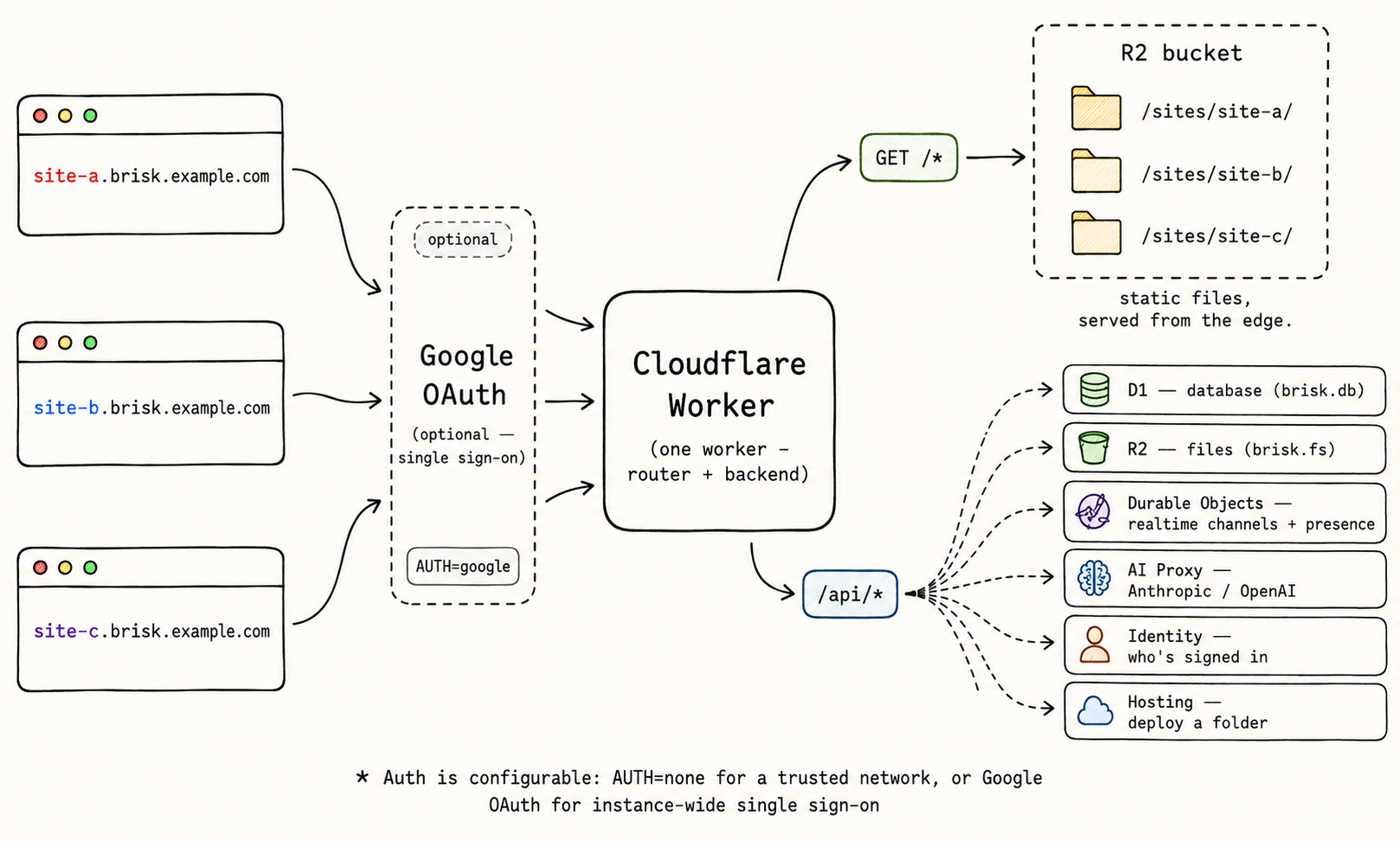
Every request to every site hits a single Cloudflare Worker. It reads the site from the
subdomain (or a /s/<name>/ path), then either streams that site's static
files straight from R2, or — for brisk.* calls under /api/ — talks
to the backing primitives: D1 for the database, R2 for uploads, a Durable Object per site
for realtime, and a server-side key for AI. An optional Google OAuth gate sits in front;
with it off, every visitor is a trusted dev user.
Stand it up
From the repo: create the resources, apply the schema, ship the Worker.
cd worker
export CLOUDFLARE_ACCOUNT_ID=...      # or run `wrangler login` (single account)
npx wrangler d1 create brisk          # paste the id into wrangler.jsonc
npx wrangler r2 bucket create brisk
npx wrangler d1 migrations apply brisk --remote
pnpm --filter @usebrisk/sdk build        # bundle the SDK into the worker assets
npx wrangler deploy
That alone gives path-mode URLs
(https://brisk.<account>.workers.dev/s/foo/) with no auth — fine on a
private network. The full experience adds wildcard subdomains and a login.
Instance config (BASE_HOST, AUTH, the allowlists,
VISIBILITY) isn't committed to wrangler.jsonc — it's
deployment-specific. Set it as Variables in the dashboard
(Workers & Pages → your worker → Settings → Variables and Secrets); every var
is optional and defaults to a path-only, no-auth, private instance. Locally,
wrangler dev reads them from .dev.vars.
Self-hosting (Docker, Compose, Kubernetes)
Cloudflare is the reference target, not a requirement. The same core runs as a plain Node server with the platform's seams bound to SQLite, the filesystem or any S3-compatible bucket, and in-process websockets — the SDK, the dashboard, and every deployed site behave identically. The fastest way in is the wizard, which asks a few questions and writes the config for whichever target you pick. It lives in this repo, so run it from a checkout:
pnpm install && pnpm build
node create-brisk/dist/index.js
Or go straight to the artifacts in deploy/:
# a single VM
cp deploy/.env.example deploy/.env      # set AUTH, BASE_HOST, secrets…
docker compose -f deploy/docker-compose.yml up -d

# Kubernetes
helm install brisk deploy/helm/brisk \
  --set config.baseHost=brisk.example.com \
  --set config.auth=google \
  --set secrets.googleClientId=… \
  --set secrets.googleClientSecret=… \
  --set secrets.sessionSecret=$(openssl rand -hex 32) \
  --set ingress.enabled=true
Storage defaults to filesystem-plus-SQLite on one volume — no external services; set
config.storage=s3 — plus the s3.* endpoint and bucket values and
the S3 credentials under secrets — to put objects in any S3-compatible bucket
instead. Realtime lives in-process, so run exactly one replica (the Helm chart refuses to
render more). The
deploy/README
holds the full environment-variable reference and the backup story:
the volume is the database — nothing replicates it for you.
The login, demo-mode, and AI sections below apply to a self-hosted instance too — every
wrangler secret put becomes the same variable in .env or the Helm
values. Subdomains need a wildcard DNS record and TLS pointed at your box instead of
Cloudflare's; demo mode's rate-limiting advice is Cloudflare's, so bring your own (usually
at the reverse proxy); the cost section stops applying entirely (the cost is the box).
Wildcard subdomains
Serve foo.brisk.example.com by setting the BASE_HOST variable to
the host your sites hang off of, then attaching the domain and route
in the dashboard (Workers & Pages → your worker → Settings →
Domains & Routes):
- custom domain:
brisk.example.com - route:
*.brisk.example.com/*(zone:example.com)
Don't add these as a routes key in wrangler.jsonc: with routes in
the config, wrangler dev rewrites every local request's Host to the production
zone, so foo.localhost breaks and the API hands out production URLs from local
dev. Dashboard-attached domains persist across deploys, so it's one-time setup.
You also need a wildcard DNS record (*.brisk → CNAME to the apex). The matching
TLS certificate is the one part that can cost money — see Cost for the
free path (keep sites one level deep, or use a dedicated domain).
Google login
Optional single sign-on for the whole instance: Google OAuth on the apex, with the session cookie scoped to the parent domain so one login covers every site subdomain.
-
Create an OAuth client (web application) in Google Cloud Console with redirect URI
https://brisk.example.com/auth/callback. -
Set the secrets:
npx wrangler secret put GOOGLE_CLIENT_ID npx wrangler secret put GOOGLE_CLIENT_SECRET npx wrangler secret put SESSION_SECRET # any long random string npx wrangler secret put DEPLOY_TOKEN # optional, for CI -
Set the auth variables in the dashboard:
AUTH=google, and restrict who gets in withALLOWED_EMAIL_DOMAINS=yourco.comfor a company, orALLOWED_EMAILS=you@gmail.comfor a personal instance (never allowlist all ofgmail.com). Either list admits; both empty admits anyone with a Google account.
Browsers get bounced to Google; the CLI logs in as a real person with
brisk login brisk.example.com, and deploys are attributed to that email. The
DEPLOY_TOKEN secret is the CI credential (BRISK_TOKEN, shows up as
ci@brisk). The default "AUTH": "none" skips all of this and treats
every visitor as a trusted dev user — only do that on a network you trust.
Public demo mode
Instances are private by default — everything but /llms.txt needs a login. To
let strangers see your sites without being able to touch them, set
VISIBILITY=public alongside AUTH=google.
-
Visitors (no login) can browse the dashboard, the docs, and every
deployed site. Their static requests are edge-cached (
max-age=300), so a busy demo costs almost no R2/D1 operations — the trade-off is a deploy can take up to five minutes to reach signed-out eyes. -
Everything else is a 401 for visitors — the database (reads included),
AI, uploads, websockets, deploys, and CLI token minting. Demo pages render; their
brisk.*calls fail fast, so build demos to degrade gracefully. - Members (whoever passes your allowlist) sign in and get the full, uncached platform.
The API has no rate limiting, so before publishing spend two minutes in the Cloudflare dashboard on your zone — both are free and stop abusive traffic before it bills as Worker requests:
- Security → WAF → Rate limiting: one rule on your host, e.g. block for 10 s when an IP exceeds ~100 requests.
- Security → Bots: enable Bot Fight Mode.
And leave DEPLOY_TOKEN unset unless you actually have CI — an unset secret
means that auth path doesn't exist at all.
AI keys
Set the provider keys as secrets and brisk.ai works on every site with no
per-site setup — keys stay on the server.
npx wrangler secret put ANTHROPIC_API_KEY # and/or OPENAI_API_KEYUsage bills against your own provider account at their rates — see Cost.
Cost
Brisk is built to run inside Cloudflare's free tier. At personal or small-team scale the whole platform — hosting, database, file storage, and realtime — fits inside it, so it costs nothing. Here's what each piece uses and the free allowance it draws from (per Cloudflare account):
| Product | Brisk uses it for | Free tier |
|---|---|---|
| Workers | every request to every site and API | 100k requests/day, 10 ms CPU/request |
| R2 | site files + brisk.fs uploads |
10 GB stored, 1M writes + 10M reads/mo, zero egress |
| D1 | the site registry + brisk.db documents |
5 GB, 5M row-reads/day, 100k row-writes/day |
| Durable Objects | one realtime room per site (brisk.channel, db events, presence) |
included on the free plan (SQLite-backed) |
Realtime stays free even idle. Each site's room is a SQLite-backed Durable
Object using WebSocket hibernation, so empty rooms bill nothing — you only pay while
messages actually flow. And on a public instance, signed-out static views are edge-cached
(max-age=300), so demo traffic mostly never reaches R2 or D1 at all.
When you'd cross into paid. 100k requests/day is a lot of headroom for an internal instance. Exceed it and you're on Workers Paid ($5/mo), which turns the daily caps into a forgiving monthly pool (10M requests + 30M CPU-ms included, cheap overage after). At that point R2, D1, and Durable Object usage beyond the included amounts also start metering, but for most instances the $5 base is the whole story.
The one catch is wildcard TLS. Cloudflare's free Universal SSL covers a
domain's apex and one level of subdomain. Sites one level deep —
foo.example.com, with BASE_HOST=example.com — are covered for
free. Nest them under a label — foo.brisk.example.com — and that second-level
wildcard needs an
advanced certificate
(~$10/mo). Two ways around it: register a dedicated domain (~$10/year at Cloudflare
Registrar, at cost) and point BASE_HOST at its apex so every
*.yourdomain site gets free TLS; or skip subdomains entirely and serve
path-mode URLs (/s/foo/), which never need a wildcard.
AI is pass-through. brisk.ai calls bill against the server's
own Anthropic or OpenAI key at provider rates — the only cost here with no ceiling, so set a
spend limit on the provider side if your sites lean on it.
Bottom line for a personal instance: $0/mo on path mode with no AI, or about $10/year (a dedicated domain) for clean subdomain URLs with free TLS — plus whatever AI tokens your sites spend.